In this article I want to share problems I faced while running Debezium in production with PostgreSQL, and solutions where they exist. This material is based on a talk I gave at SmartData 2025. I assume that you already know what CDC is and how Debezium works in general — if not, start with PostgreSQL: Log-based CDC using debezium and Kafka-connect: overview.
All examples below were tested with PostgreSQL 15, 16 and 17. If a version is not mentioned explicitly, PostgreSQL 17 is assumed. Examples are implemented using a runtime wrapper around Debezium Engine, but the same problems and solutions apply to the Kafka Connect connector, Debezium Server, and other deployment options.
Typical architecture
Before diving into problems, let’s briefly look at the typical setup used in most examples.
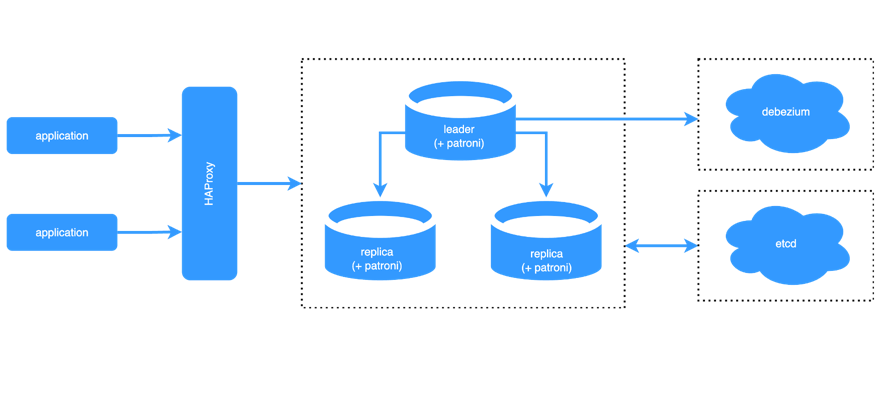
In production we usually have a PostgreSQL cluster. Debezium connects to the leader node using logical replication and streams changes to a sink — Kafka, S3 or anything else. Physical replication between leader and replicas is shown for context: Debezium reads the WAL from the leader, not from replicas (with one exception that we’ll discuss later).
Code samples for all environments mentioned in this article can be found in the presentations repository.
Initial setup
Most problems start from replication configuration, so let’s define the initial conditions used in the examples.
 1CREATE TABLE debezium_offsets
 2(
 3    id                TEXT PRIMARY KEY,
 4    offset_key        TEXT,
 5    offset_val        TEXT,
 6    record_insert_ts  TIMESTAMP NOT NULL,
 7    record_insert_seq INTEGER   NOT NULL
 8);
 9
10CREATE TABLE data
11(
12    id    uuid PRIMARY KEY,
13    value TEXT
14);
15
16SELECT pg_create_logical_replication_slot('debezium_slot', 'pgoutput');
17
18CREATE PUBLICATION debezium_publication;
19ALTER PUBLICATION debezium_publication ADD TABLE public.data;
The setup consists of three parts:
- Offset storage table — in these examples offsets are stored in PostgreSQL itself using JDBC offset backing store, not in Kafka topics.
- Data table — a simple table that we want to replicate.
- Logical replication slot and publication — created manually before starting Debezium.
More details about WAL, logical replication and Debezium setup options can be found in the article about logical replication in postgres and debezium-postgres.
Initial snapshots
The first group of problems is related to initial snapshots — getting the current state of tables before (or during) streaming changes.
Need initial table state before streaming
Problem: you need to get the initial state of a table before starting replication.
Solution: use snapshot.mode=INITIAL. Debezium will read the current content of all captured tables and then switch to streaming.
Adding new tables to an existing connector
Problem: you need to change the list of replicated tables and get the initial state of newly added tables.
With snapshot.mode=INITIAL, snapshots are not triggered for tables that were added after the connector started.
Solution: one option is to create a new replication slot and publication alongside the existing one and start a new connector instance.
Another option is to use snapshot.mode=INITIAL_ALWAYS, add a table to the publication and restart the connector:
1ALTER PUBLICATION debezium_publication ADD TABLE public.new_table;
After restart Debezium will snapshot all tables, including the new one. But now we have another issue.
Avoiding repeated snapshots on every restart
Problem: with snapshot.mode=INITIAL_ALWAYS every restart triggers a full snapshot of all tables.
Solution: do not use INITIAL_ALWAYS in production unless you really need it.
Instead, manage snapshots manually for a specific subset of tables using ad-hoc snapshot signals — we’ll discuss this in the next section.
Ad-hoc snapshots
Ad-hoc snapshots allow you to trigger a snapshot on demand without recreating the connector or restarting it for all tables. This feature is especially useful not only for adding new tables, but also for repairing existing ones (for example, after a lost update).
Manual snapshot control
Problem: you need to control when snapshots run, so that newly added tables can get their initial state without affecting the rest.
Solution: set snapshot.mode=INITIAL or snapshot.mode=NO_DATA and use Debezium signals.
Signals can be sent via a Kafka topic, JMX, the source channel (a table in the database), or a custom channel.
In production the source channel is often the most convenient option. You can also combine them and set multiple channels.
Minimal connector configuration for source channel type:
1signal.enabled.channels=source
2signal.data.collection=public.signals
Create a signals table and add it to the publication:
1CREATE TABLE signals
2(
3    id   TEXT NOT NULL PRIMARY KEY,
4    type TEXT NOT NULL,
5    data TEXT
6);
7
8ALTER PUBLICATION debezium_publication ADD TABLE public.signals;
To trigger a blocking snapshot for a specific table:
1INSERT INTO signals(id, type, data)
2VALUES (
3    gen_random_uuid(),
4    'execute-snapshot',
5    '{"type": "BLOCKING", "data-collections": ["public.data"]}'
6);
More examples (including incremental snapshots and filtered blocking snapshots) are available in the code samples README.
Long transactions from BLOCKING snapshots
Problem: a BLOCKING snapshot for a large table holds a transaction open for too long, which negatively affects the whole cluster:
- WAL keeps growing
- total disk usage increases
- queries against other tables may suffer
To understand why, we need to look at how PostgreSQL MVCC and vacuum work.
When a snapshot is taken, PostgreSQL records the horizon of active transactions:
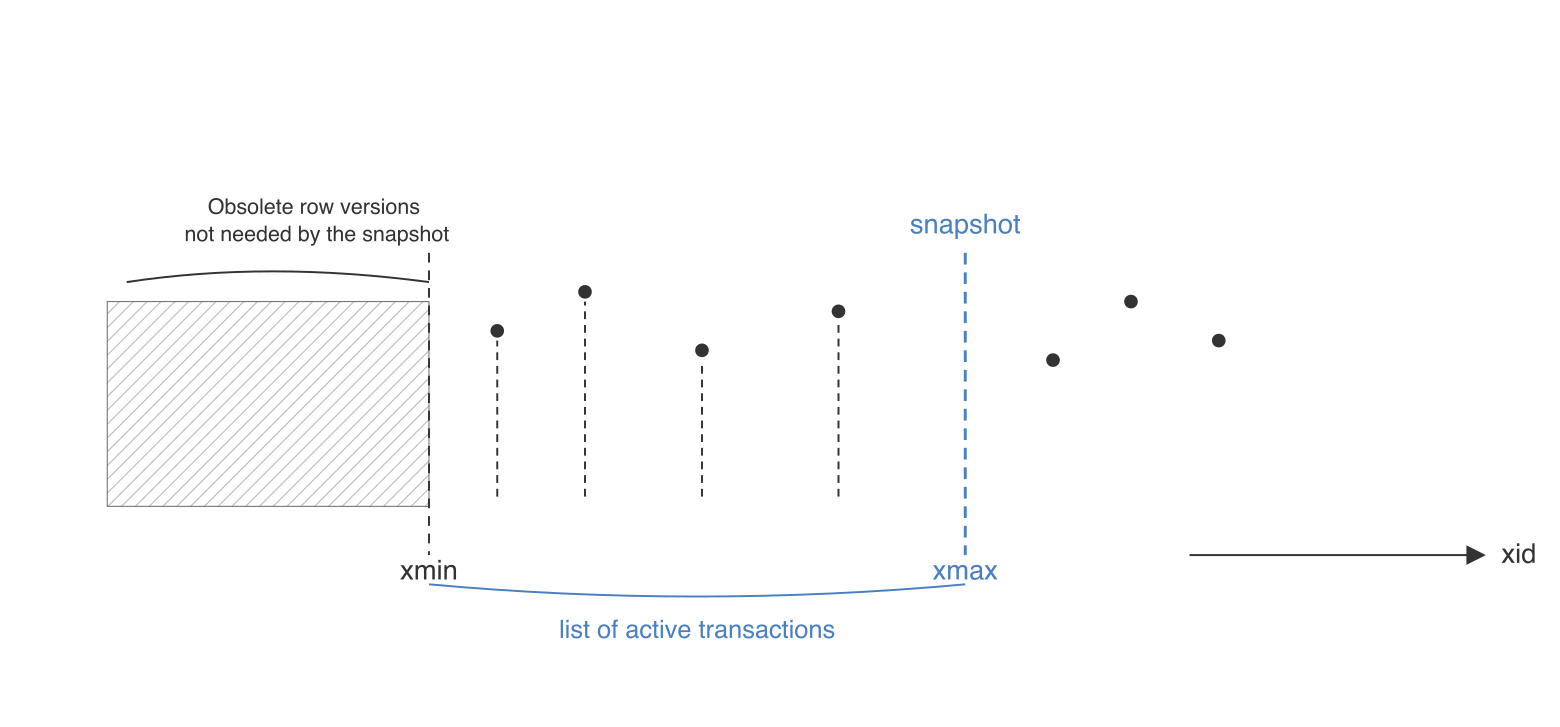
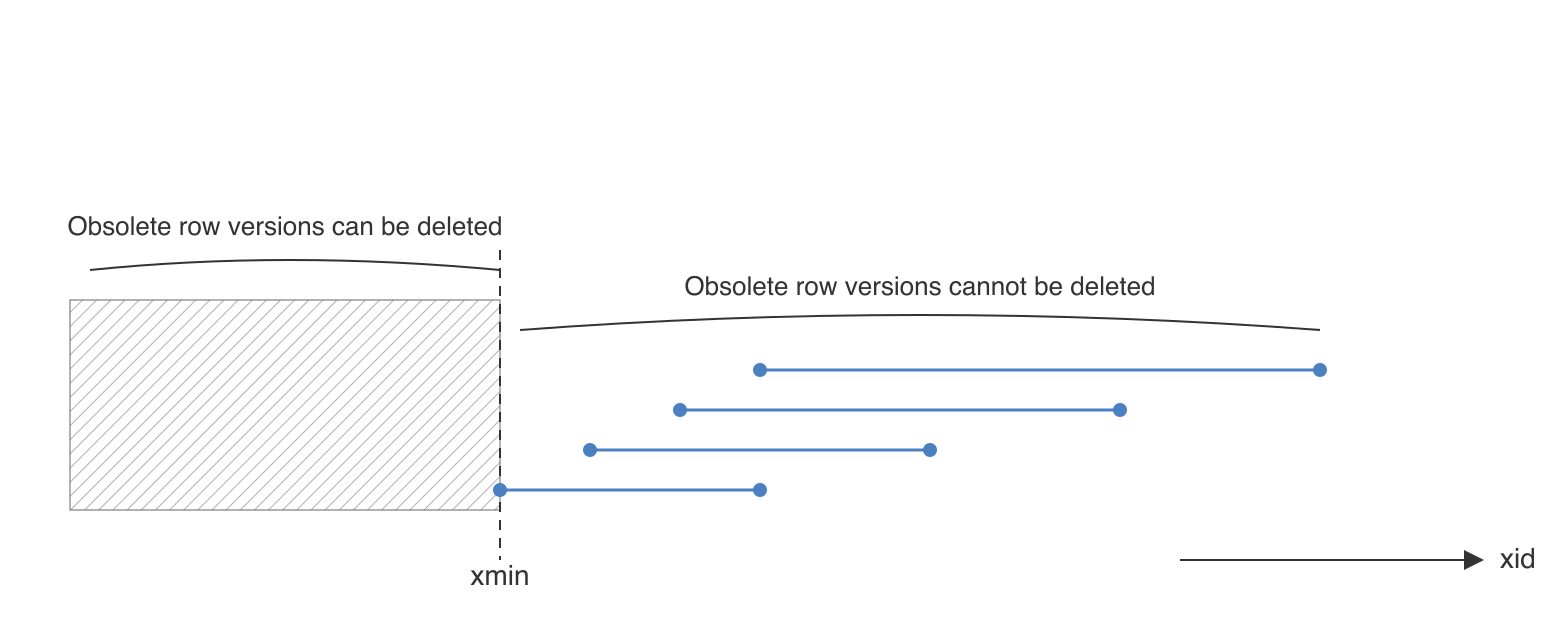
While the snapshot transaction is open, PostgreSQL cannot remove old row versions that might still be visible to it:
Vacuum uses the visibility map to skip pages that do not need cleanup, but pages with dead tuples inside the horizon still have to be processed:
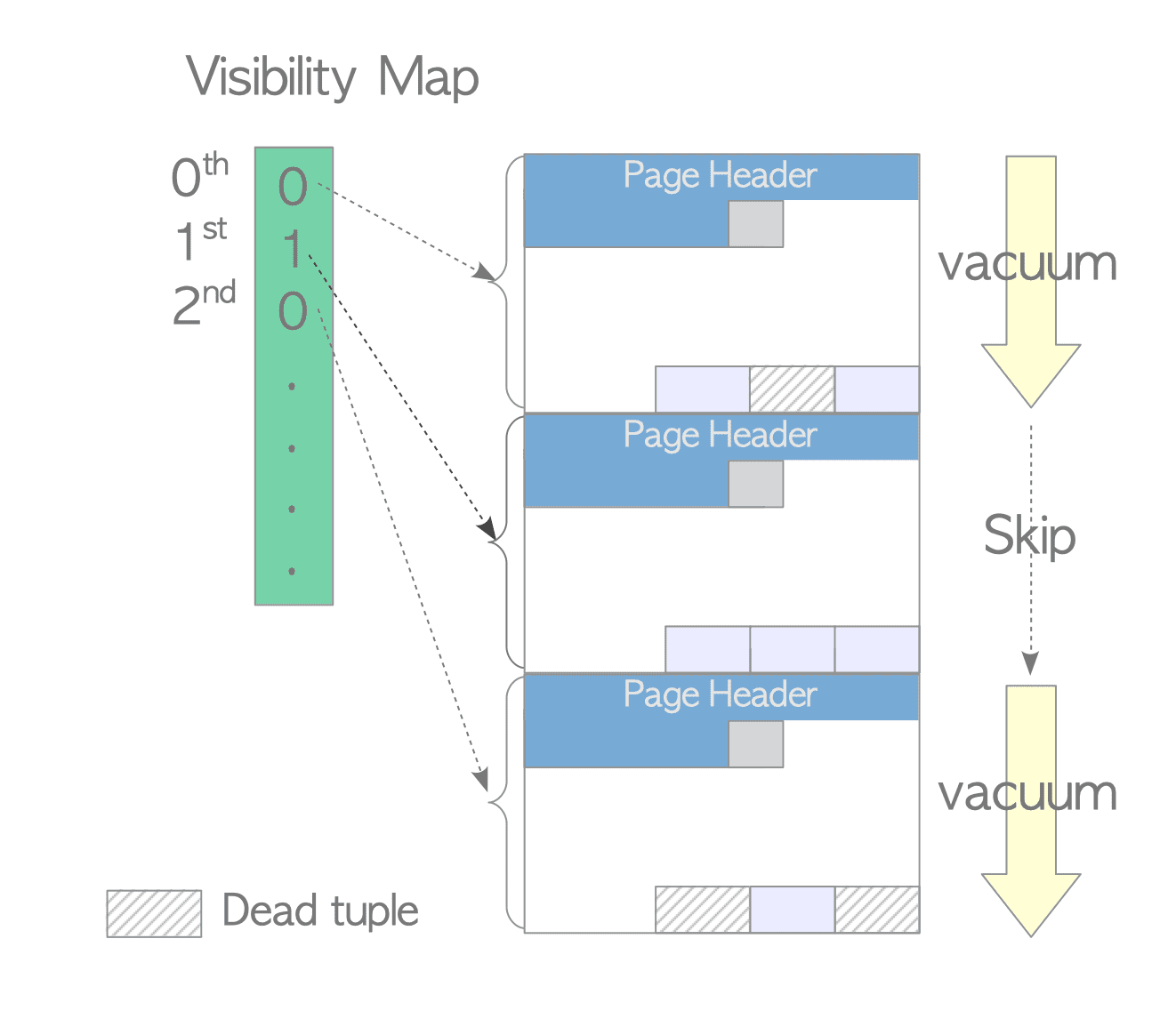
Source: interdb.jp — visibility map
Solution: use an INCREMENTAL snapshot instead of BLOCKING. Incremental snapshots work in chunks and do not hold a single long-running transaction.
1INSERT INTO signals(id, type, data)
2VALUES (
3    gen_random_uuid(),
4    'execute-snapshot',
5    '{"type": "INCREMENTAL", "data-collections": ["public.data"]}'
6);
Debezium splits the table into chunks ordered by primary key:
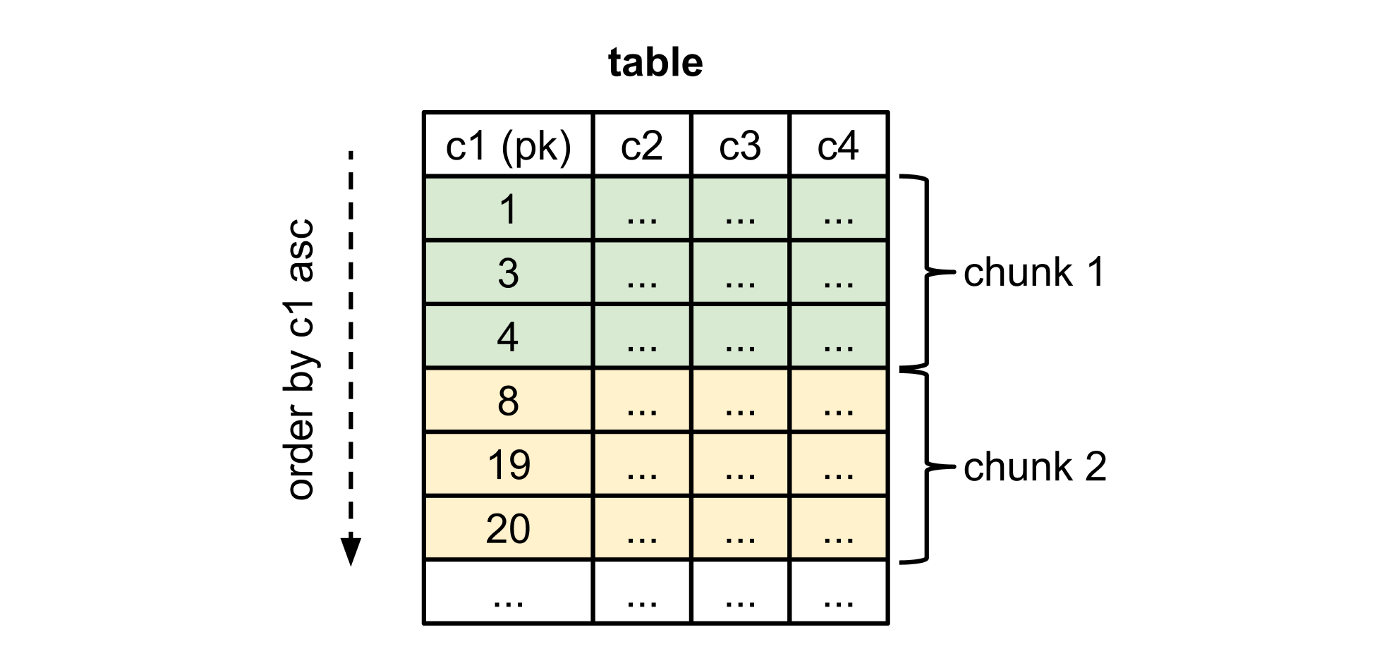
Chunk size can be tuned with incremental.snapshot.chunk.size.
warning
Incremental snapshots work only with the
sourcechannel.
Incremental snapshot without a primary key
Problem: INCREMENTAL snapshot works only for tables with a primary key.
Solution: starting from Debezium 2.2 you can specify a surrogate-key in the signal payload:
1INSERT INTO signals(id, type, data)
2VALUES (
3    gen_random_uuid(),
4    'execute-snapshot',
5    '{"type": "INCREMENTAL", "data-collections": ["public.data"], "surrogate-key": "field1"}'
6);
Snapshot takes too long
Problem: snapshot of a very large table can take hours or even tens of hours.
Solution: there is no universal fix inside Debezium itself. Options include:
- implement custom snapshot logic tailored to your data layout
- use another tool for initial load (for example, Apache Flink CDC) and switch to Debezium for streaming afterwards
For now, Debezium supports parallel snapshotting across tables, but each individual table snapshot still runs serially.
Signal sent but snapshot does not start
Problem: you sent a snapshot signal but nothing happens.
Solution:
- wait for any WAL activity on tables included in the publication — Debezium may not process the signal until it receives the next change event
- make sure the signals table itself is added to the publication
Incremental snapshot fails with missing schema
Problem: incremental snapshot fails because table schema is not available yet.
Solutions: this is a known bug with several workarounds:
- trigger any change on the target table before sending the signal
- upgrade Debezium to a version newer than 3.1.2
- run a BLOCKING snapshot with a filter and
LIMIT 0to force schema registration:
1INSERT INTO signals(id, type, data)
2VALUES (
3    gen_random_uuid(),
4    'execute-snapshot',
5    '{"type": "BLOCKING", "data-collections": ["public.data"], "additional-conditions": [{"data-collection": "public.data", "filter": "SELECT * FROM public.data LIMIT 0"}]}'
6);
Reducing snapshot load on the primary
Problem: DBAs do not want any additional read load from snapshots on the primary node.
Solution: starting from PostgreSQL 16 and Debezium 2.5+ you can configure logical replication on replicas and run snapshots against a replica instead of the primary. See Debezium documentation on reading from replicas.
Reliability and monitoring
Snapshots are not the only source of trouble. The next group of problems appears when replication runs for a long time in production.
Replicating rarely updated tables
Problem: you replicate a rarely updated table (for example, a reference/dictionary table) while other tables in the same database receive active writes. If no changes happen on the captured tables for a long time, the replication slot does not advance and WAL accumulates on the primary.
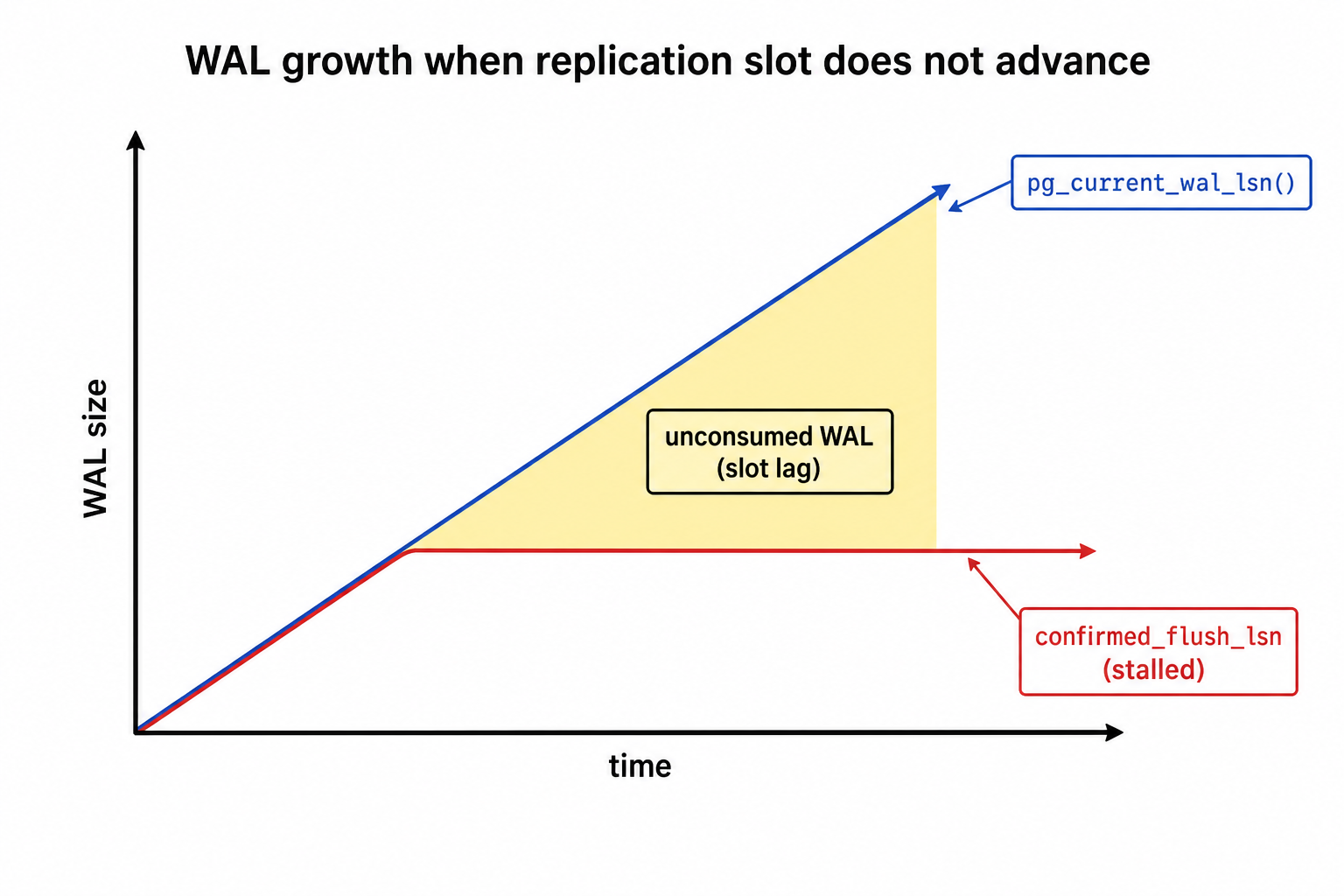
Solution: use a heartbeat table. Periodically update a single row so that Debezium always receives events and the slot advances. It is important to add the heartbeat table to the publication.
1CREATE TABLE heartbeat
2(
3    single_row  bool PRIMARY KEY DEFAULT TRUE,
4    last_update TIMESTAMP NOT NULL,
5    CONSTRAINT single_row_check CHECK (single_row)
6);
7
8ALTER PUBLICATION debezium_publication ADD TABLE public.heartbeat;
A background job (or cron) should run a query to update the heartbeat table:
1UPDATE heartbeat SET last_update = now() WHERE single_row IS TRUE;
Debezium can also handle it. To configure the heartbeat query and related options, use these properties:
1heartbeat.interval.ms=5000
2heartbeat.action.query={your custom query}
Avoiding read-only mode when disk is full
Problem: replication was down for a long time, WAL growth consumed all free disk space, and the database switched to read-only mode.
Solution: configure max_slot_wal_keep_size to limit how much WAL a replication slot is allowed to retain.
Keep in mind the trade-off: if the consumer falls too far behind, the slot may become invalid, and you will need to re-snapshot affected tables.
Technical monitoring
Problem: you need to monitor the technical health of replication.
Solution: at minimum, monitor:
- replication slot status (active/inactive)
- slot lag in bytes
- total disk usage on the database node
The most useful query for slot lag:
1SELECT slot_name,
2       pg_wal_lsn_diff(pg_current_wal_lsn(), confirmed_flush_lsn) AS slot_lag_bytes
3FROM pg_replication_slots
4WHERE slot_type = 'logical';
Pay attention to pg_wal_lsn_diff — it shows how many bytes of WAL the slot has not yet consumed.
Business monitoring
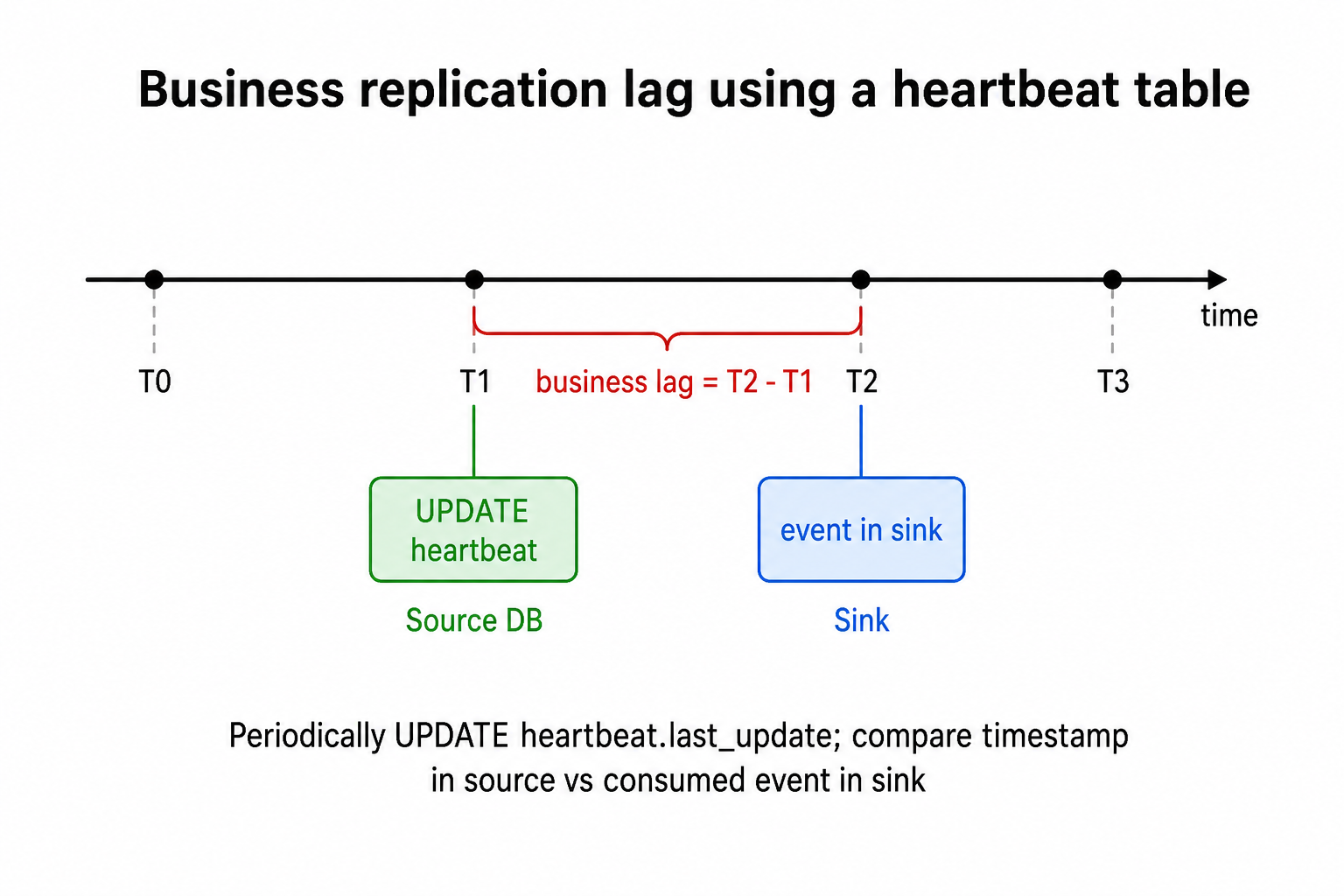
Problem: byte-level lag is useful for DBAs, but business teams often want replication lag in seconds.
Solution: use the same heartbeat table described above.
Compare last_update from the source with the timestamp of the heartbeat event in the sink.
The difference is your business-level replication lag.
Data repair
Deduplication of CDC events
Problem: The default at-least-once semantics are not enough, and you need exactly-once delivery (or, more precisely, at-least-once with deduplication).
Solution: You can use a business key from the event when one exists; otherwise, use the LSN, which every record includes.
More information about LSN:
warning
The only exception regarding LSN is incremental snapshots: during an incremental snapshot, events do not have a unique LSN; instead, the LSN is null.
Data recovery after replication gaps
Problem: Because of an incident, some INSERT/UPDATE events were lost. The table(s) are too large for a full snapshot, and you want to minimize recovery time.
Solution: If you know the concrete time range (or even specific record IDs) during which UPDATE/INSERT events were lost, you can snapshot them using filters. Examples for blocking and incremental snapshots:
 1INSERT INTO signals(id, type, data)
 2VALUES (
 3    gen_random_uuid(),
 4    'execute-snapshot',
 5    '{"type": "BLOCKING", "data-collections": ["public.data"], "additional-conditions": [{"data-collection": "public.data", "filter": "SELECT * FROM public.data WHERE timestamp > X and timestamp <= Y"}]}'
 6);
 7
 8INSERT INTO signals(id, type, data)
 9VALUES (
10    gen_random_uuid(),
11    'execute-snapshot',
12    '{"type": "INCREMENTAL", "data-collections": ["public.data"], "additional-conditions": [{"data-collection": "public.data", "filter": "timestamp > X and timestamp <= Y"}]}'
13);
note
For incremental snapshots, the filter field contains only the
WHEREcondition; for blocking snapshots, it contains the full query.
Lost DELETE events
Problem: Because of an incident, some DELETE events were lost. In this case, filtered snapshots cannot help.
Solution: A snapshot is still required, but it can be done in different ways:
- Snapshot with data removal in the target system to avoid duplicate records. The disadvantage of this approach is that you lose all saved history.
- Snapshot with a new
epoch_id. In this case you do not need to clean up the target system, but you must customize replication logic slightly and add a system field that indicates the epoch for each row. After the snapshot, you can build a full diff between epoch X+1 and epoch X.
Non-standard table replication
Tables without a primary key
Problem: Logical replication expects each table to have something that can uniquely identify its rows, but in practice not all tables have a primary key or even a unique column.
Solution: For tables without a PK or unique column, change the replica identity:
1ALTER TABLE table_name REPLICA IDENTITY FULL;
With FULL replica identity, the whole row is used as the identifier. That is enough for replication, but keep in mind that it also adds extra WAL overhead.
The same FULL replica identity technique can be used for tables with:
- TOAST columns
- A need to diff
beforeandafter: withFULLreplica identity, each event has a non-nullbeforesection
Partitioned tables
When replicating a partitioned table, you may want the table field in each event to be the parent table name, not table_pX.
To achieve that, set publish_via_partition_root to true on the publication.
1// publish_via_partition_root=false
2{"before":  {}, "after": {}, "source":  {"schema":  "schema", "table":  "table_prt_1"}}
3// publish_via_partition_root=true
4{"before":  {}, "after": {}, "source":  {"schema":  "schema", "table":  "table"}}
TimescaleDB hypertables
Problem: You need to replicate a hypertable from the TimescaleDB extension. Standard replication approaches may not handle such tables correctly because hypertables use different partitioning logic.
Solution: Adapt the publication to replicate the whole _timescaledb_internal schema to handle shards, and configure an additional transform for Debezium:
1transforms=timescaledb
2transforms.timescaledb.type=io.debezium.connector.postgresql.transforms.timescaledb.TimescaleDb
3transforms.timescaledb.database.hostname=localhost
4transforms.timescaledb.database.port=5432
5transforms.timescaledb.database.user=postgres
6transforms.timescaledb.database.password=postgres
7transforms.timescaledb.database.dbname=postgres
This transform also requires connection settings because it handles shard metadata itself. Create the publication like this:
1CREATE PUBLICATION {publication-name} FOR TABLES IN SCHEMA _timescaledb_internal
After that, you will receive events from each shard of the root hypertable.
Advanced replication
Replication with transaction metadata
Problem: You need to replicate data strictly along transaction boundaries. For example, if table A is updated in the source within one transaction, the target should apply those changes as a single unit.
Solution: Debezium can attach transaction-boundary metadata to each event via provide.transaction.metadata=true:
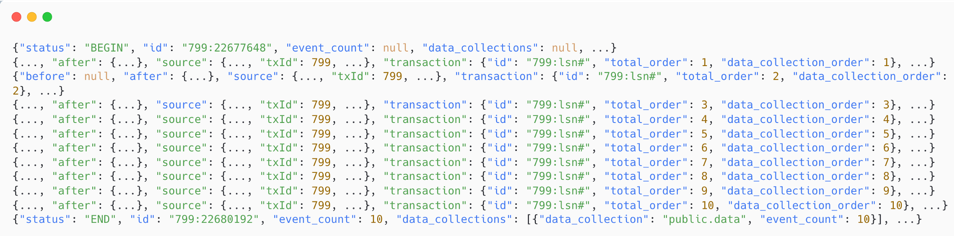
You will also receive two additional event types, BEGIN and END, marking the start and end of a transaction.
Schema evolution in general
With Debezium you can replicate data in Avro format and store schemas in an external schema registry. One of the biggest issues in this setup arises when a replicated table is altered in a non-compatible way. Schema registries support at least seven compatibility modes (NONE, BACKWARD, FORWARD, FULL, BACKWARD-TRANSITIVE, FORWARD-TRANSITIVE, FULL-TRANSITIVE), but in this example I consider only BACKWARD.
Imagine there is a table:
1CREATE TABLE data(
2  key BIGINT PRIMARY KEY,
3  field_1 INT NOT NULL,
4  field_2 INT NOT NULL,
5  field_3 INT
6)
For a BACKWARD-compatible change, only the following changes are valid:
- Add a new optional field (nullable, with a default)
- Remove a field (required or optional)
- Change a field type: int → long, float → double
If someone adds a new required field, which PostgreSQL allows, a new Avro schema is created that is not compatible with the previous one. Debezium will then stop replication, which can lead to data loss because the slot may be invalidated after some time.
Fully avoiding this is probably impossible, but you can at least reduce the impact:
- Set subject compatibility to
NONEin the schema registry. Then even a non-compatible change is accepted, replication continues, but the problem is merely deferred downstream. - Introduce data contracts. This is mostly an organizational change, not a technical one, but it helps coordinate schema changes and avoid incompatible updates.
Conclusion
Debezium is a powerful tool for log-based CDC, but production usage with PostgreSQL brings many non-obvious problems: initial and ad-hoc snapshots, long-running transactions, WAL retention, monitoring and more. Most of them have workable solutions, but you need to know about them before they hit you in production.
I hope this article will help you avoid at least some of these surprises. If you want to reproduce the examples, check the code samples repository.